What to Do with Wedding Photos: 10 Creative Ideas
Discover what to do with wedding photos, from live slideshows and albums to social posts, thank-you cards, backups, and lasting keepsakes.
From first scan to shared album
See what to do with wedding photos: 10 creative ideas from the guest’s side.
Discover what to do with wedding photos, from live slideshows and albums to social posts, thank-you cards, backups, and lasting keepsakes.










After the wedding, your photos usually live in too many places at once. There's the professional photographer's gallery, several phone camera rolls, group chats, social posts, shared folders, and perhaps a disposable camera waiting to be developed. The collection can feel exciting for a few days, then strangely difficult to manage.
The most useful answer to what to do with wedding photos isn't one grand project. It's a sequence. Share a few moments while the celebration is still fresh, turn the strongest files into tangible keepsakes, then preserve the complete collection before access expires or files disappear into old devices.
That process involves more than choosing your favorite image. You'll need to consider consent, file quality, privacy, access control, curation time, and backup locations. A browser-based service such as The Wedding Pics can collect guest photos, videos, and messages in one private album through a QR-code upload, without requiring guests to install an app or create an account.
A 2026 analysis of real weddings found a median guest-photo album of 149 photos from 8 unique uploaders, while the average wedding collected 197 guest photos from 9.8 unique guests. The average uploader contributed 26.3 photos, which suggests that participating guests often send a meaningful batch rather than one isolated image. The wedding guest-photo statistics make a strong practical case for treating guest images as an archive that needs organization, not as a few attachments to chase later.
Table of Contents
- 1. Live Venue Slideshow Display
- 2. Multi-Day Wedding Event Consolidation
- 3. Guest Guestbook with Voice Messages and Handwritten Notes
- 4. Social Media Content Curation and Sharing with Consent
- 5. Printed Photo Books and Wall Art Collections
- 6. Wedding Highlight Reel and Video Compilation Creation
- 7. Organized Photo Archive with Original Quality Preservation
- 8. Family Tree Archive and Multi-Generational Legacy Collection
- 9. Professional Portfolio and Marketing Content for Wedding Vendors
- 10. Candid Photographer Documentation and Professional Reference
- 10-Option Comparison: Uses for Wedding Photos
- Choose the Uses That Fit Your Memories
1. Live Venue Slideshow Display
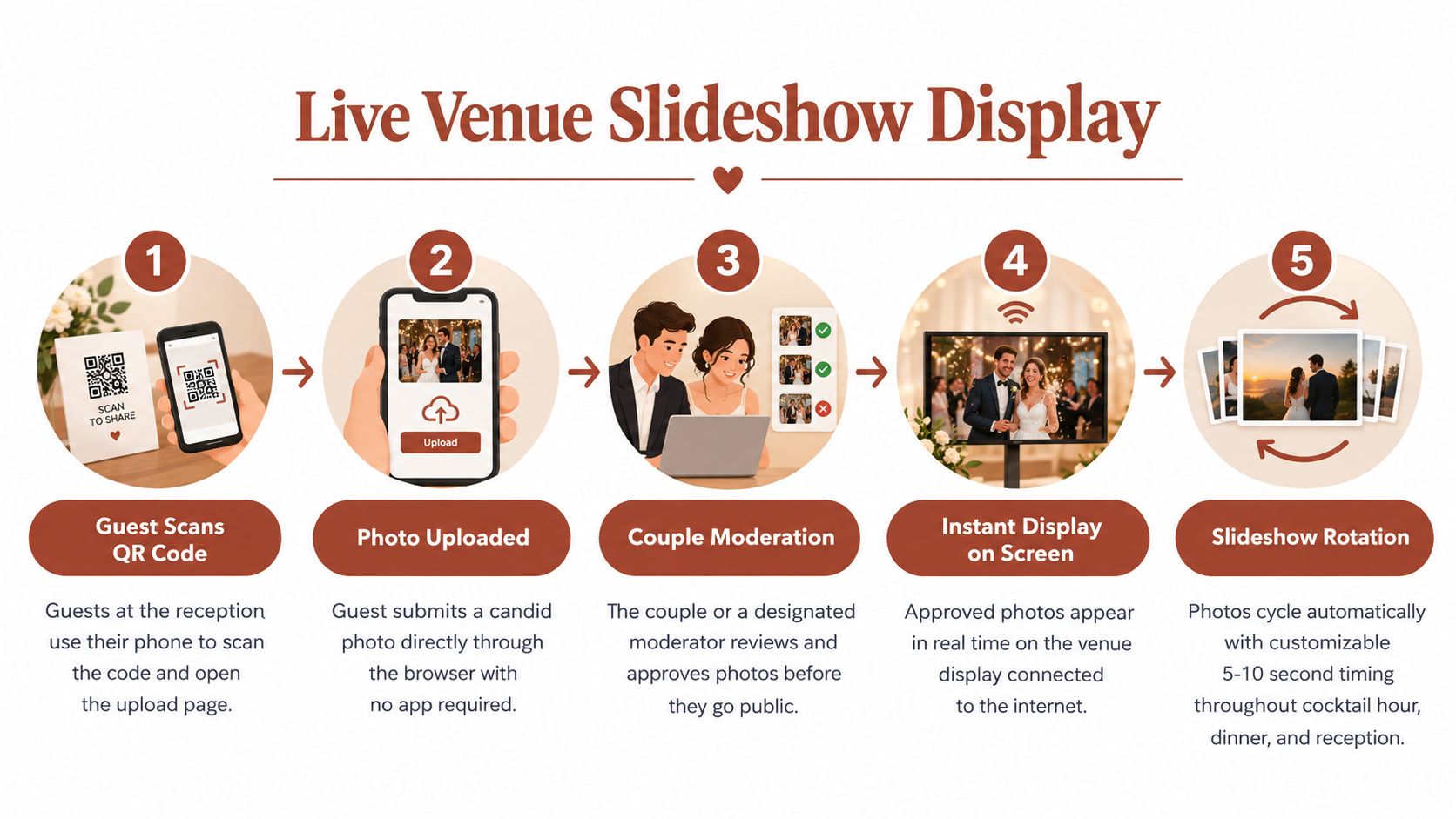
A live slideshow gives guest photos a purpose before the reception is over. Guests scan a QR code, upload from their phone browser, and the couple or a designated moderator approves selected images for display. Approved photos can then appear on a venue screen, projector, or television while the celebration continues.
This works particularly well during cocktail hour, dinner, or a relaxed reception segment. It gives guests a reason to contribute and creates a changing view of the day from perspectives the professional photographer may not be standing near. A destination wedding with reliable venue Wi-Fi, a large ballroom, or a multi-day gathering can all benefit from the format.
Keep the display curated
Unmoderated uploads shouldn't appear automatically on a public screen. Assign the task to a coordinator, sibling, or trusted member of the wedding party who can review images without being pulled into other reception duties. The Wedding Pics includes moderation before approved photos appear in the gallery or slideshow, which gives the couple control over what guests see.
Practical rule: Test the internet connection, projector, screen, and slideshow workflow before guests arrive, and keep an offline display option available in case the connection fails.
Use clear signage with a direct prompt such as, “See your photo on the big screen. Upload now.” Don't place the slideshow over a ceremony reading or important speech. It should add atmosphere, not compete with moments guests came to watch.
For setup inspiration, see this guide to making a wedding slideshow. The best result is a display that feels spontaneous to guests but remains carefully governed by the couple.
2. Multi-Day Wedding Event Consolidation
A wedding weekend rarely consists of one event. Guests may take photos at the welcome dinner, rehearsal gathering, ceremony, reception, after-party, and farewell brunch. If every occasion uses a different chat or upload link, the collection becomes difficult to search and easy to abandon.
A single private album can hold the full celebration, with clearly named sub-albums for each part of the schedule. Guests can use the same QR code throughout the weekend, while the couple keeps the timeline organized by event. This is especially useful for destination weddings and celebrations spread across several venues.
Name each moment while it's fresh
Use labels that tell future viewers exactly what they're opening. “Friday Welcome Dinner,” “Saturday Ceremony,” and “Sunday Brunch” are more useful than “Album 1” or “Weekend Photos.” Printed QR cards can include the event name beneath the code, so guests understand where their uploads belong.
Coordinate signage with the planner or venue team. A QR card on a dinner table may need different wording from one near the dance floor. Keep the instruction short, explain that no app download is needed, and mention whether guests can also upload short videos or messages.
Extend the upload window beyond the wedding day if guests are likely to discover photos later. A guest may return home, find images in a camera roll, and only then remember to share them. Centralization also helps separate the couple's private archive from public posts on social platforms.
The workflow is practical because guest behavior is otherwise easy to lose. Independent 2026 reporting on guest photo sharing found that 94% of adult wedding guests carry a smartphone with a working camera, 71% take at least one photo, but only 8–12% share unprompted when there's no clear collection mechanism. A visible, repeated invitation matters.
3. Guest Guestbook with Voice Messages and Handwritten Notes
Photos preserve what guests saw. Messages preserve what they felt, remembered, or wanted to tell you when the room was too busy for a long conversation. Pairing a written guestbook with photos creates a richer record than a signature page that gets packed away after the reception.
Invite guests to leave a short note alongside a photo. Parents and grandparents might record a blessing, friends might describe how they met the couple, and long-distance guests can leave a message even if they didn't have much private time with you during the event. Audio can also capture tone and laughter that text can't reproduce.
Make the message easy to give
Place the prompt where guests naturally pause. A welcome table, lounge area, or quiet corner can work better than the busiest part of the dance floor. Add a sample message from someone in the wedding party so guests understand that a sincere sentence is enough.
The Wedding Pics supports written guestbook entries and optional voice notes on relevant plans. Before the event, test the recording experience and choose a quieter location for clearer audio. Ask guests to keep recordings concise, particularly if you plan to listen to them together during dinner or on an anniversary.
A useful archive should remain accessible to more than one kind of listener. Download voice files separately from the photo archive, retain the original audio, and consider creating written transcripts for relatives who are deaf or hard of hearing, or for anyone who wants to search the collection later.
Read how an audio guest book can complement wedding memories before deciding whether spoken messages suit your celebration. Don't pressure guests to record. Consent applies to voice and video just as it does to identifiable photographs, and some people will prefer a private written note.
4. Social Media Content Curation and Sharing with Consent
The wedding gallery can supply social content long after the professional preview arrives, but public sharing should be deliberate. A guest's photo may show children, private conversations, someone who opted out of social media, or a moment that was funny in the room but uncomfortable online.
Start with a private shortlist. Review the image, identify everyone who is recognizable, and ask for permission before posting when the situation calls for it. A guest who uploaded a photo to a private wedding album hasn't automatically agreed to commercial use, public reposting, or inclusion in a vendor's portfolio.
Build a slower rhythm
You don't need to publish the entire story at once. A small carousel can focus on getting ready, another on the ceremony, and another on the people who made the day feel personal. A private family album may be more appropriate than a public post for candid images that matter to you but don't need broad distribution.
Give credit where appropriate. Tag the guest photographer, professional photographer, venue, or vendor only when that person or business has agreed to be identified. Keep captions specific, such as a memory about a toast or a quiet moment before the ceremony, rather than treating every image as generic promotional material.

Social platforms also compress files and can change access rules. Keep the original files in your private archive, and use exported copies for posts. This wedding photo privacy guide can help you think through visibility settings, guest expectations, and the difference between private collection and public publication.
Digital sharing is the dominant behavior, but it shouldn't become the only destination. Wedding photography trend coverage reported that 94% of couples shared photos digitally, while 44% ordered any prints, 32% ordered a professional album, and 22% printed more than 10 photos. Those figures show why couples need a plan for both online access and physical preservation.
5. Printed Photo Books and Wall Art Collections
A printed book forces useful decisions. Instead of asking what to do with wedding photos in the abstract, you choose the images that explain the day in sequence. The finished object becomes easier to revisit than a cloud folder containing every near-duplicate and accidental pocket shot.
Begin with original-quality files, not screenshots or images downloaded from social media. Sort the collection into broad groups such as preparation, ceremony, portraits, details, dinner, dancing, and guests. Then remove duplicates, blurry frames, closed eyes, and images that are meaningful only because you remember the moment behind them.
Build a visual story
A book needs rhythm. Open with atmosphere, move through anticipation and ceremony, give the people around you room in the middle, and end with a strong emotional or celebratory image. You don't need to include every important person on every page. A clear narrative usually feels more personal than an exhaustive catalogue.
For wall art, choose a smaller set of images that work together in color and mood. A triptych might combine a ceremony scene, a first dance, and a quiet portrait. A hallway gallery can mix professional portraits with guest candids, but use consistent frames or spacing so the collection looks intentional.
“The best printed collection isn't the one with the most images. It's the one you'll still want to open when the event no longer feels recent.”
Download the originals before any platform storage period ends, and keep a backup before sending files to a print lab. This guide to wedding photo albums and guest books can help you compare a formal album with a more informal guest-led book.
Consider making separate editions for yourselves and close family. Parents may prefer family groups and ceremony images, while your own book may include the imperfect, funny, and behind-the-scenes moments that tell the fuller story.
6. Wedding Highlight Reel and Video Compilation Creation
Still photos can become a film when you sequence them with intention. A highlight reel might combine professional portraits, guest candids, short phone videos, ceremony details, and reception scenes. The format works for a private anniversary screening, a television display, or a shorter social edit.
Start by downloading the files and arranging them chronologically. Create a rough storyboard before choosing transitions or music. Preparation leads into arrival, ceremony, congratulations, dinner, dancing, and the final exit. If a guest video includes important sound, let that natural audio guide part of the sequence instead of covering every moment with music.
Edit for the destination
A social version should be short enough to watch without commitment. A family version can take more time and include slower scenes, spoken messages, or longer clips. Export a viewing copy for ordinary devices, but retain the highest-quality project or master file you can reasonably maintain.
Use music you have permission to use. Licensed libraries such as Epidemic Sound, Artlist, or YouTube Audio Library offer routes that are safer than adding a commercial track and discovering that a platform has muted or removed the video. Keep color and exposure consistent across phone photos and professional images, since mixed sources can look jarring when placed side by side.
Free and paid editing tools can both work. DaVinci Resolve, iMovie, Adobe Premiere, and CapCut offer different levels of control. Use restrained transitions, readable text, and pacing that follows the emotion of the scene rather than trying to make every frame feel dramatic.
Guest videos need the same consent review as photographs. Someone may have uploaded a clip for the couple's private enjoyment but not want it placed on YouTube or used in a public reel. Keep the private master separate from the version you publish.
7. Organized Photo Archive with Original Quality Preservation
Before making anything creative, secure the files. Cloud galleries and event platforms are useful for collection and review, but they shouldn't be the only place your wedding memories exist. Storage windows close, links become inaccessible, accounts get forgotten, and devices fail.
Download the complete archive in its original quality, including guest photos, videos, and message files where available. A ZIP export can make this easier by preserving a centralized collection rather than requiring you to save images individually. Open the downloaded archive and test several files before deleting or closing anything online.
Use a clear folder system
Create folders that a person unfamiliar with the wedding could understand. You might organize by event, location, or moment type. Use names such as “Ceremony,” “Reception,” “Guest Candids,” and “Messages,” then place a short README file at the top with the couple's names, wedding date, venue, and notes about permissions.
Keep at least one local copy and one cloud copy. An external drive protects against account access problems, while cloud storage protects against a single damaged device. These copies should not sit in the same physical location if the collection is especially important.
The guest archive complements, rather than replaces, the professional photographer's delivery. Keep the photographer's originals, edited files, contracts, and usage terms in a separate folder. Guest images may contain the candid angles and ordinary interactions that the formal coverage doesn't include, but they may also vary widely in exposure, resolution, and file format.
No archive is finished when the download button says complete. Check that videos play, images open, folders contain what you expect, and the backup service has finished syncing. Then set a recurring reminder to review the drives and confirm that the files remain readable.
8. Family Tree Archive and Multi-Generational Legacy Collection
Wedding photos become family history when you add context. Years from now, relatives may recognize faces without remembering names, or understand a relationship only if someone recorded it. A well-labeled archive turns a folder of images into a useful record for people who weren't at the celebration.
Add the information future viewers won't be able to infer. Record the couple's names, event date, venue, locations, names of close relatives, and the relationship of important guests. If the wedding included several cultural or family traditions, add a short note explaining what happened and why it mattered.
Preserve context with the files
Keep original files for quality and JPEG copies for broad compatibility. Avoid relying on a proprietary catalogue that only one application can read. If you add keywords or metadata, also include a plain-text information file so the archive remains understandable even if software changes.
Assign an archive keeper. This person can maintain access, update contact information, add future family photos, and explain the folder structure to relatives. The role doesn't have to belong to the oldest family member or the person who took the most photos. It should belong to someone willing to review the collection occasionally.
Access control matters here too. A family archive can be private while still allowing selected relatives to view copies. Don't publish a family tree, guest list, or identifiable images just because they seem historically valuable. Ask living relatives about sensitive images, children, and photos taken in private settings.
Store copies in separate places, such as a home drive, a trusted cloud account, and a relative's device. The purpose isn't to create needless duplication. It's to ensure that one lost laptop, failed drive, or inaccessible account doesn't erase the only record of the celebration.
9. Professional Portfolio and Marketing Content for Wedding Vendors
A wedding can generate useful working images for the planner, venue, florist, rental company, or stylist. Guest photos often show details from angles the official photographer didn't prioritize, including the room in use, the transition from ceremony to reception, and how guests experienced the design.
That usefulness doesn't create automatic marketing permission. Couples should decide whether vendors can use particular images, where the images may appear, and how long the permission lasts. Identifiable guests may need their own consent, especially when a vendor plans to use an image prominently rather than incidentally.
Put the agreement in writing
A clear permission request should identify the intended use. A vendor might ask to use selected images on a website portfolio, social account, printed brochure, or private sales presentation. The couple can approve all, some, or none of those uses, and can exclude images involving children or sensitive guests.
For vendors, organize approved files by service and context. A florist might need ceremony arrangements, tablescapes, and bouquet details. A venue may want wide room views and guest-flow images. A planner might organize the material by event stage so future couples can understand how the space was used.
Credit the appropriate contributors. Guest photography isn't the same as commissioned professional photography, and a vendor shouldn't present an unlicensed image as its own work. Confirm whether the professional photographer's contract places restrictions on commercial use, even if a guest captured the image.
The safest workflow keeps two collections: a private master archive and a small, permission-cleared marketing folder. That separation reduces accidental posting and makes it easier to honor a later request to remove an image. A private QR-based album can support the initial collection, but commercial publication still requires a separate consent decision.
10. Candid Photographer Documentation and Professional Reference
Guest photos can help the professional photographer or videographer understand the day from another angle. They may reveal a reaction that happened outside the official camera position, show how guests moved through the venue, or provide a reference for an album designer choosing between similar moments.
Couples should decide whether to share the guest archive with their creative team. If they do, provide access through a controlled gallery or selected folder rather than forwarding a collection through multiple group chats. The couple should retain control over downloads and onward sharing.
Use the archive as a reference, not a replacement
A photographer can review guest images while memories are still clear and compare them with the delivered coverage. This may identify an important family interaction that deserves attention in an album design, or suggest an alternative sequence for a highlight film. Guest files can also help explain the timing of an event when the formal shot list doesn't tell the whole story.
The creative team should not assume that a guest image is free to publish or incorporate into a paid deliverable. Obtain the couple's explicit approval, confirm who owns or controls the file, and check whether the guest expects credit. If a guest photo appears in a final album or video, keep a record of that permission.
For future planning, the archive can reveal practical gaps. Perhaps the dance floor was well covered but the welcome dinner had few images, or family groups were difficult to coordinate in the chosen room. Those observations can improve shot lists, assistant positioning, and communication at another event.
The most valuable guest photo may not be the sharpest one. It may show who was present, what happened between formal moments, or how the room felt from a guest's seat. Preserve those documentary qualities while keeping quality, consent, and ownership clear.
10-Option Comparison: Uses for Wedding Photos
| Item | Implementation Complexity 🔄 | Resource Requirements ⚡ | Expected Outcomes ⭐📊 | Ideal Use Cases | Key Advantages ⭐ | Quick Tip 💡 | |---|---:|---|---|---|---|---| | Live Venue Slideshow Display | 🔄 Medium, live moderation & AV setup | ⚡ Stable venue Wi‑Fi, display screen, moderator | ⭐⭐⭐📊 High real‑time engagement; dynamic visuals | Cocktail hours, receptions, outdoor projections | Real‑time display, encourages sharing, quality control | 💡 Test internet 24h prior; designate moderator; 5–10s per photo | | Multi‑Day Wedding Event Consolidation | 🔄 Medium, album & sub‑album planning | ⚡ Extended storage, more sub‑albums (Std/Premium), printed QR signage | ⭐⭐📊 Centralized multi‑event archive; simplified guest flow | Destination/multi‑day weddings, weekend celebrations | One QR for all events, chronological organization, extended uploads | 💡 Name sub‑albums clearly; print dated QR cards; use Premium for 5+ events | | Guest Guestbook with Voice Messages & Notes | 🔄 Low–Medium, enable features & quiet space | ⚡ Devices with mics, Standard/Premium for voice notes | ⭐⭐📊 Emotional multimedia keepsake; searchable archive | Intimate weddings, accessibility needs, sentimental collections | Captures tone/emotion, integrates with photos, digital alternative to paper | 💡 Provide quiet corner; set 30–60s voice limit; seed examples | | Social Media Content Curation (with Consent) | 🔄 Medium–High, curation, consent workflow | ⚡ Time for editing, consent tracking, original files | ⭐⭐📊 Ongoing engagement and shareable high‑quality posts | Couples/planners wanting sustained social presence | High‑quality source material, guest crediting, narrative posts | 💡 Ask permission at upload; batch‑edit; create a posting calendar | | Printed Photo Books & Wall Art Collections | 🔄 Medium, curation, layout & print coordination | ⚡ Original‑res files, editing software, printing budget | ⭐⭐⭐📊 Heirloom prints and giftable keepsakes | Family gifts, home displays, anniversary editions | Print‑ready originals, multiple copies for gifting, tangible art | 💡 Download ZIP early; select 100–200 best; use pro lab | | Wedding Highlight Reel & Video Compilation | 🔄 High, editing, sequencing, music licensing | ⚡ Video software, time, licensed music, photo/video sources | ⭐⭐⭐📊 Emotionally engaging, shareable 3–5min narratives | Social sharing, family highlight videos, anniversary recaps | Dynamic storytelling, integrates guest video+photos | 💡 Storyboard first; use licensed music; export short+long versions | | Organized Photo Archive with Original Quality Preservation | 🔄 Low–Medium, download & organize archive | ⚡ External hard drive/cloud backup, time to sort | ⭐⭐⭐📊 Permanent, print‑ready backup; lossless preservation | Long‑term preservation, print projects, professional backups | Lossless originals, comprehensive documentation, easy exports | 💡 Download before expiry; back up to 2+ locations; include README | | Family Tree Archive & Multi‑Generational Legacy Collection | 🔄 Medium, metadata, naming & curation | ⚡ Substantial storage, long‑term backups, assigned archive keeper | ⭐⭐⭐📊 Multi‑generational heirloom; genealogy resource | Family historians, grandparents, international families | Preserves lineage context, searchable multi‑perspective archive | 💡 Use descriptive filenames, include README, assign an archive keeper | | Professional Portfolio & Marketing Content for Vendors | 🔄 Medium, permission management & curation | ⚡ Access to originals, written permissions, time for branding | ⭐⭐📊 Authentic portfolio content, cost‑effective marketing | Venues, planners, florists building real‑wedding portfolios | Diverse real‑event imagery, demonstrates execution in situ | 💡 Obtain couple permission and model releases; offer incentives | | Candid Photographer Documentation & Professional Reference | 🔄 Low–Medium, review & cross‑check guest photos | ⚡ Album access, time to analyze, organization tools | ⭐⭐📊 Verifies coverage, finds alternative angles, edit references | Photographers/videographers verifying coverage and gaps | Fills coverage gaps, timeline verification, edit inspiration | 💡 Request album access in contract; review within 1–2 weeks |
Choose the Uses That Fit Your Memories
The best answer to what to do with wedding photos starts with protection, not decoration. Creative projects are easier and less stressful once the complete collection exists somewhere you control. Before you order a book, publish a reel, or close an event gallery, download the original files and confirm that the archive opens correctly.
Use this practical sequence:
-
Secure the originals first. Export the professional gallery and guest collection while they're available. Include full-resolution photos, videos, audio messages, written notes, and any useful metadata. Open sample files after downloading and verify that a second backup has finished syncing.
-
Choose one immediate use and one tangible project. An immediate use might be a moderated slideshow, a private family gallery, or a carefully selected social carousel. A tangible project could be a coffee-table book, framed wall collection, family gift book, or edited video. Limiting the first round of projects keeps the collection manageable and gives you time to make better choices later.
-
Create redundant backups with clear rules. Store the archive in more than one place, use descriptive names and dates, and separate private originals from public exports. Write down who can view, download, edit, or publish files. Assign one person to maintain the collection so responsibility doesn't disappear after the thank-you notes are sent.
Consent should remain part of every stage. Guests may be happy to upload a photo privately but uncomfortable seeing it on a public account. Vendors may want portfolio material, but commercial use requires a clear agreement. Children, family members, and guests who avoid social media deserve particular care. If you're uncertain, keep the image private.
File quality also changes what remains possible. A social-media download may look fine on a phone but fail as wall art. A compressed chat attachment may not preserve enough detail for a book. Keep original-quality files for printing, editing, and future family use, then create smaller copies for messaging and online publication.
Access control makes the archive easier to share without making it public. A private album, guest PIN, invite-only viewing, or couple-only download setting can help distinguish between people who may look at the collection and people who may take the files elsewhere. Review those settings before sending a link to extended family or vendors.
The Wedding Pics can support the collection stage with private QR-based uploads, moderation, original-quality downloads, guestbook messages, and whole-album ZIP export. It can bring guest photos, videos, and messages into one place, but the couple still decides what to display, share, print, and preserve. Technology can reduce the file chase. It can't decide which memories belong in public, which belong in a family archive, or which image will matter most years from now.
The Wedding Pics gives couples a private QR-based way to collect guest photos, videos, and messages without asking guests to install an app or create an account. Use it to gather the full collection, moderate what appears during the celebration, and download original files for your books, displays, and long-term archive. Visit The Wedding Pics to set up your wedding photo collection.
- what to do with wedding photos
- wedding photo ideas
- wedding photo album
- wedding photo storage
- wedding keepsakes