Create a Bridal Shower Photo Album: The Complete Guide
Learn how to create a bridal shower photo album with QR uploads, guest collection strategies, and curation tips for a cherished keepsake.
From first scan to shared album
See create a bridal shower photo album: the complete guide from the guest’s side.
Learn how to create a bridal shower photo album with QR uploads, guest collection strategies, and curation tips for a cherished keepsake.










A dedicated QR-based system is the most practical way to create a bridal shower photo album, especially when guests are already generating more images than one group chat can hold. Recent wedding-photo data recorded a median of 52 guest uploads, while 44% of couples never printed a single wedding photo, making a centralized digital collection a useful bridge between spontaneous sharing and a lasting keepsake.
The day after the shower, the family chat is usually overflowing. One guest has sent a burst of blurry screenshots, another has posted a polished portrait, and someone else says they have “loads more” sitting in their camera roll. By the time the host tries to assemble a bridal shower photo album, the best images are scattered across messages, email threads, social posts, and phones.
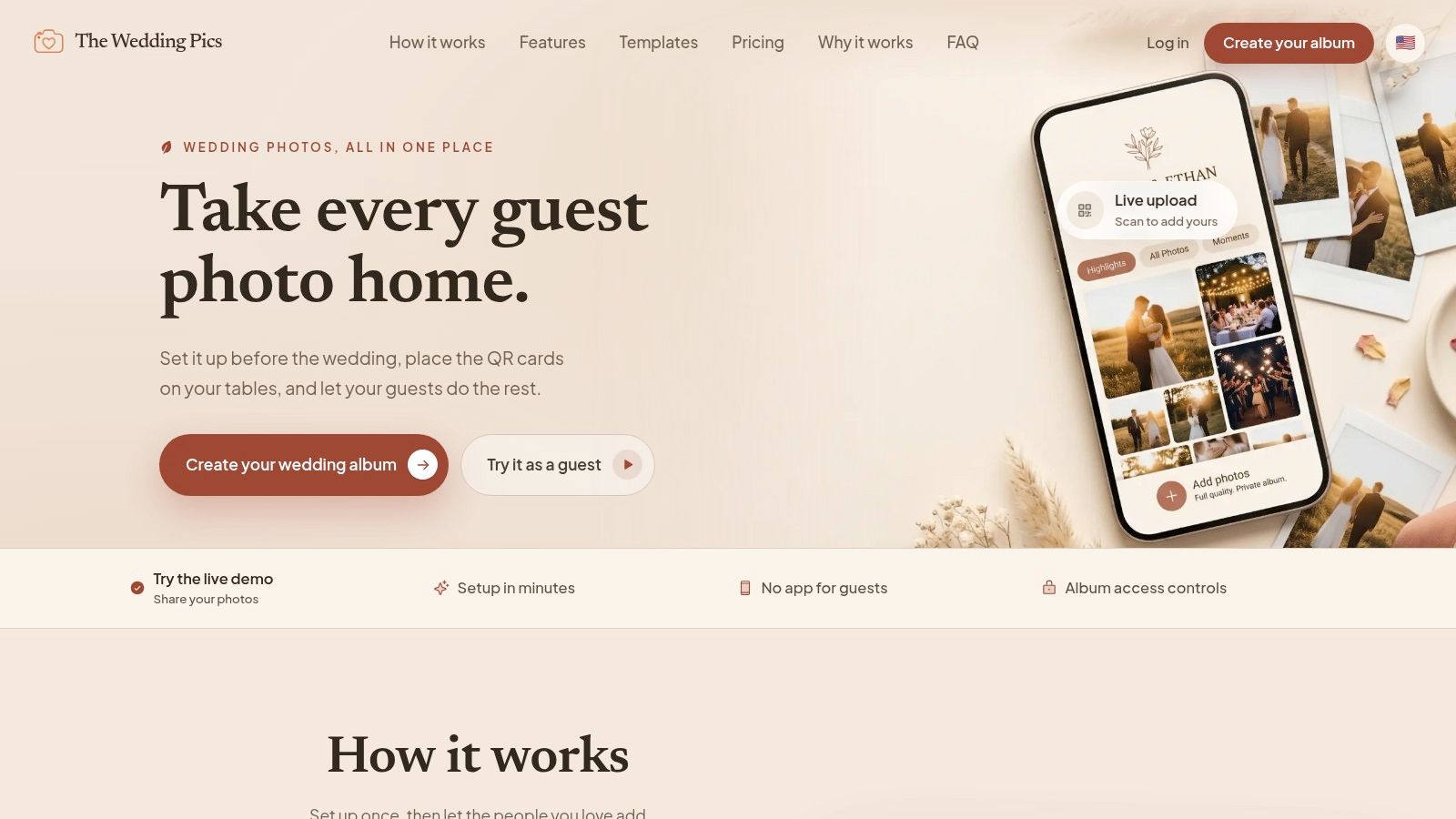
A simple QR code can change that workflow. Guests scan, upload from their mobile browser, and send their photos to one private gallery. The important work, though, isn't choosing a pretty template. It's deciding who can see uploads, who reviews them, what happens for guests without smartphones, and how the files become both a digital archive and a physical album.
Table of Contents
- Why Modern Photo Collection Outgrew the Group Chat
- Setting Up Your Centralized Digital Hub
- Designing the Physical Keepsake
- Strategies for Inclusive Guest Participation
- Timeline and Export Checklist
- Pro Tips for a Lasting Memory Book
Why Modern Photo Collection Outgrew the Group Chat
A bridal shower can produce more photographs than any one person can sort during the event. Several guests may capture the same gift opening from different angles, while conversations, decorations, handwritten messages, and quieter moments remain on separate phones. The traditional album workflow, one person selecting prints and arranging them in order, cannot reliably capture that distributed record.
The volume is only one part of the problem. In 2026 wedding-photo data, the median wedding collected 52 guest uploads, the top quarter collected more than 180, and the top 10% exceeded 350. Only 22% of files arrived within 24 hours of the first upload, while 54% arrived within a week, according to recent wedding photo collection data. A shower collection follows the same pattern: guests remember additional images at different times, so the host needs a clear place for late submissions.
Why group chats make poor archives
Group chats work for quick conversation, not controlled preservation. Images may be compressed, buried under replies, or posted in several conversations. A host can spend hours downloading, renaming, and sorting files before selecting anything for the album. The process also creates privacy questions: who can view every upload, whether unapproved images are visible, and how a guest without a smartphone contributes.
The same dataset found that 94% of couples shared photos digitally, 32% ordered a professional album, and 44% never printed a single wedding photo. Digital sharing is now common, but scattered sharing leaves the host responsible for collection, review, and backup.
Practical rule: Make the gallery the master collection and the printed book the edited edition.
That workflow also preserves material a hired photographer may miss, including candid photographs, guestbook messages, short videos, and small details from the room. Moderation matters before anything reaches the final album. A host can remove duplicates, exclude private images, confirm consent, and keep the physical book focused without deleting the wider digital archive.
Bridal showers have documented roots in 16th-century Holland, where neighbors and friends gave small gifts to help a bride begin married life without a dowry. The tradition later spread and became popular in North America during the late 19th and early 20th centuries, evolving into the pre-wedding celebration many families recognize today, according to this history of bridal showers.
The album therefore records more than attractive images. It preserves the people who brought gifts, wrote messages, took informal photographs, and helped create the gathering. A paper upload card or shared device gives non-tech guests a fallback, while the host retains one reviewed collection for both digital storage and print.
Setting Up Your Centralized Digital Hub
The best collection system removes decisions from the guest. They shouldn't have to create an account, download unfamiliar software, find your email address, or guess where to send a large video. They should scan one visible code, see a clear upload page, and finish the task in a few taps.
Choose the gallery before designing the cards
Start by deciding what the gallery must handle:
- Browser uploads: Guests should be able to use the camera and browser already on their phone.
- Private viewing: Decide whether everyone can browse approved images or whether only the host and couple can view the collection.
- Original files: Check whether the system preserves files at a quality suitable for later printing.
- Moderation: Choose whether uploads appear immediately or wait for approval.
- Export: Confirm that you can download the complete collection rather than saving images one at a time.
The practical difference between an app-required workflow and a browser-based one is substantial. Independent event data reports that table-based QR placement can increase uploads by 2 to 3 times compared with sparse placement, while app-free systems convert scans into uploads at about 78%, compared with 21% for flows that require an app, according to QR sharing event case studies. These figures support a simple planning choice: place the code where guests already sit, and remove installation as a barrier.
For a more detailed look at how to build the collection point, use this guide to creating a QR code photo album.
Build the guest-facing workflow
Create the gallery, set the event name, and test the upload path from a phone that isn't logged into the host account. This catches confusing permissions, broken buttons, and unexpected sign-in requests before guests arrive.
Then prepare the physical prompts:
- Print a code for every table. Guests are more likely to participate when they don't need to walk across the room.
- Place another sign beside the gift area. Gift opening often produces the most useful photographs for the album and thank-you notes.
- Add one short instruction. “Scan to share your photos and messages” is clearer than a paragraph of technical directions.
- Assign one host to announce it. The announcement should happen early, before guests settle into conversation.
- Keep the code visible. Don't hide it beneath favors, menus, or floral arrangements.
Use a separate host account or coordinator login if the bride should remain unaware of uploads. Set the gallery to private, decide whether new files require approval, and choose whether approved images can appear on a live display. A surprise reveal and a real-time slideshow are different experiences, so decide which one the event is meant to deliver.
Designing the Physical Keepsake
A digital gallery can hold everything. A printed album can't, and that limitation is useful. The physical bridal shower photo album should tell a coherent story rather than reproduce every upload.
Begin with the event's natural sequence. A strong structure might open with the invitation or welcome table, move through arrivals and decorations, cover games and conversations, and finish with gifts, group portraits, handwritten messages, and a closing photograph. If the shower has a strong visual theme, organize by mood instead, such as florals, food, friendship, and family.
Edit for story, not volume
Remove duplicates, accidental screenshots, closed eyes, and photographs where the main subject is obscured. Keep imperfect images when they carry emotion. A slightly awkward photograph of a grandmother laughing may belong in the book more than a technically polished detail shot.
Use a simple selection system:
- Keep: Images that show people, relationships, reactions, or meaningful details.
- Review: Similar photographs, uncertain permissions, and images that need cropping.
- Leave digital: Long videos, repeated shots, and files that work better in the private archive than on paper.
A printed album also needs rhythm. Mix wide room views with close details, posed photographs with candid reactions, and full-group images with small interactions. Avoid placing every group photograph on a separate page. Several related images can show the energy of a moment more effectively than one formal portrait.
For ideas about combining printed photographs with messages and guest contributions, see this guide to wedding photo albums and guest books.
Give non-photo content a defined place
The album shouldn't treat messages as an afterthought. Reserve pages for written wishes, advice, favorite memories, or short notes from guests. You can photograph handwritten cards, scan them, or transcribe especially personal messages beneath a small portrait.
Video and voice notes need a different treatment. Print a still image with a short caption and add a discreet QR code that opens the related clip, or keep the multimedia in the private gallery and reference it from the printed page. Don't force video into a paper format that can't carry it well.
Choose the binding according to how the book will be used. A lay-flat design suits a large group album that guests will pass around, while a more traditional hardcover may work better as a shelf keepsake. The important decision is not luxury. It's whether the format supports the way the bride and family will revisit the story.
Strategies for Inclusive Guest Participation
A QR code solves only one part of the collection problem. Some guests won't carry a smartphone, won't feel comfortable uploading files, or will assume that somebody else is already taking photographs. If the system depends entirely on confident phone users, the final album will represent technology comfort rather than the whole guest list.
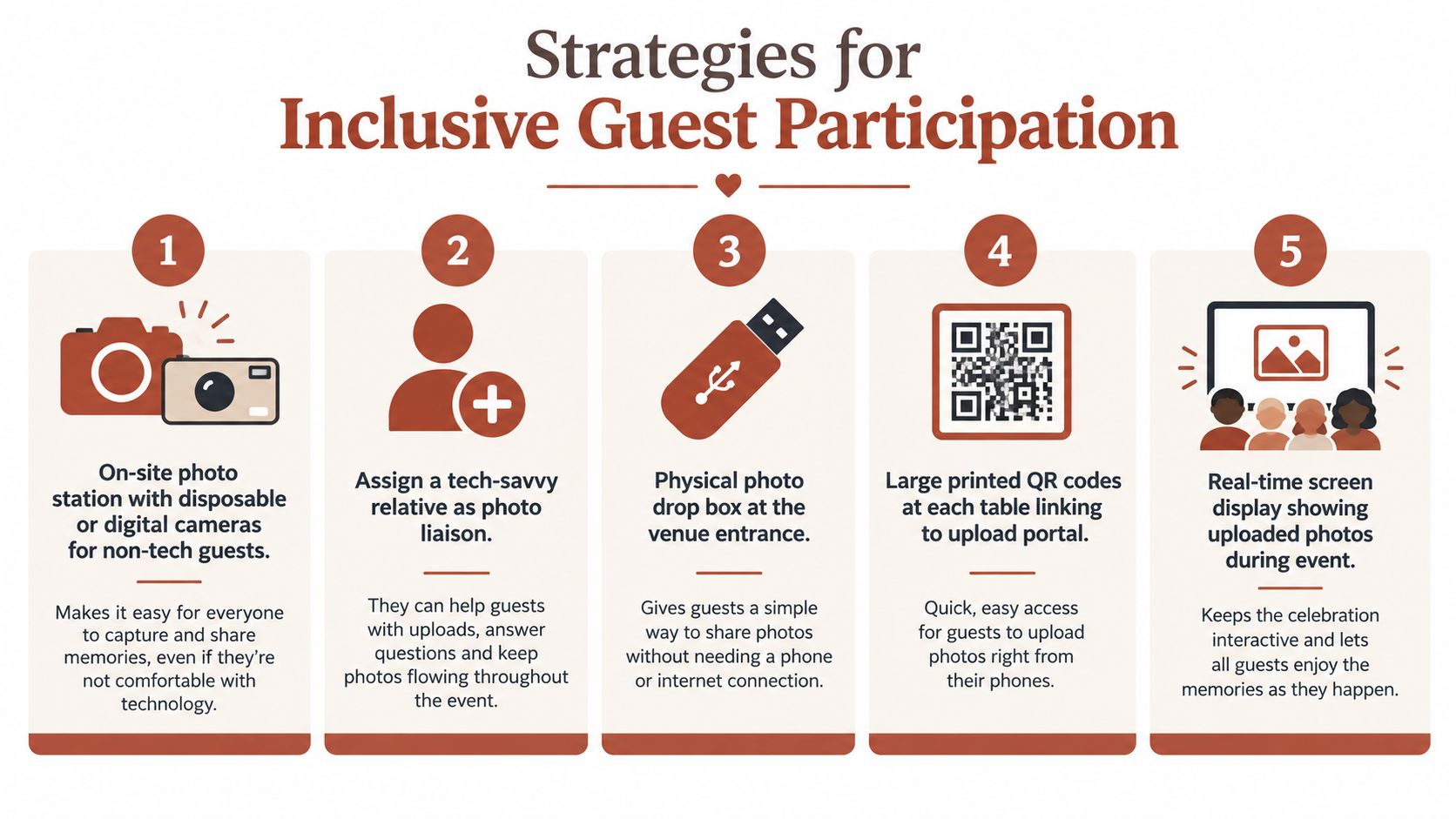
The fix is to create several routes into the same archive.
Build a fallback before anyone needs it
Assign a photo liaison who can take photographs on behalf of guests without smartphones. This person might be a bridesmaid, younger relative, venue coordinator, or trusted friend. Their job isn't to document the entire shower. They should ask non-phone guests whether they'd like a photograph, help them record a message, and upload the files later.
A physical drop box can handle printed photographs, disposable-camera film, or memory cards, provided the host labels each item with the guest's name. An on-site camera station offers another option, but it needs a clear owner. Unmanaged disposable cameras often produce uncertain results because nobody knows who will develop or digitize them.
The collection system should also accommodate guests who want to contribute words rather than images. A printed message card beside the QR sign gives everyone a meaningful way to participate. The host can later photograph or scan those cards and place them in the same archive.
Moderate without becoming the event's administrator
Moderation protects the bride's privacy and keeps a slideshow comfortable for mixed-age audiences. It also prevents the host from spending the shower staring at a dashboard.
Use two levels of review:
- Live review: One designated person checks new uploads during natural pauses, removing accidental screenshots, private conversations, or unsuitable images before they appear publicly.
- Post-event review: The host performs a slower, more thoughtful edit after the shower, checking duplicates, captions, names, and permissions before export.
If the bride is meant to be surprised, she shouldn't receive the gallery link or live notifications. If she wants to watch the collection grow, give her access only after agreeing on what can appear on a screen. The bridal shower guest book ideas guide offers useful inspiration for combining messages with visual contributions.
Privacy decision: Choose “live reveal” only when the group understands that uploads may appear quickly. Choose “post-event reveal” when guests may share personal messages, family photographs, or surprise details.
The key is to tell guests how the system works. A small sign can say that uploads are private until approved, or that selected images may appear during the event. Clear expectations prevent embarrassment and make moderation feel like hospitality rather than censorship.
Timeline and Export Checklist
The shower itself is only the collection moment. The archive becomes valuable when the host reviews it, protects the originals, and turns the strongest material into thank-you support and a printed book.
Before the shower
- Test the upload path: Scan the code from several phones, upload a photograph, and confirm where it appears.
- Confirm visibility: Check whether new files are private, pending approval, or immediately visible.
- Assign responsibilities: Name one person for announcements, one person for moderation, and one person for non-phone guests if those roles aren't handled by the same host.
- Print backup instructions: Include a short note explaining where guests can leave physical photographs or messages.
- Prepare storage: Decide where exported files will live after the event.
During the shower
Place the code at each table and near the gift area. Make the announcement early, then repeat it once when the group is actively taking photographs. Don't interrupt every activity with reminders. A visible card and one capable host usually work better than constant prompting.
Capture the physical materials too. Photograph the room before guests arrive, record the finished tablescape, and keep gift tags, advice cards, and handwritten notes together. Those details often give the final book its sense of place.
After the shower
Review the gallery while the event is still fresh. Flag images that need permission, identify guests in group photographs, and separate potential album pages from files intended only for private storage.
Download original-quality files before the platform's storage period ends. If the service supports a whole-album export, use it rather than relying on individual downloads. This guide to downloading a ZIP file explains the practical advantage of keeping one complete archive.
Store the export in at least two places, such as a computer and an external drive, or a computer and a trusted cloud service. Then choose the print selection, proof the names and captions, and order the album while the details are still easy to verify. Send thank-you notes with specific references to photographs or messages where appropriate, but don't share private uploads without the contributor's consent.
Pro Tips for a Lasting Memory Book
The strongest albums serve three purposes at once. They preserve the full digital collection, present a carefully edited physical story, and help the couple stay connected to the people who celebrated with them.
Start by separating archive decisions from design decisions. The archive can retain candid duplicates, long videos, voice notes, and images that are meaningful only to one family member. The printed book should be more selective. Keeping those roles distinct prevents the common mistake of either printing too much or deleting material only because it doesn't fit a page.
Use the collection for thank-you work. Create a small reference list linking guests to memorable photographs, gifts, or messages. A note that mentions a specific moment feels more personal than a generic message, but don't use a photograph if the guest hasn't agreed that it can be shared beyond the private gallery.
Make privacy part of the keepsake
Write down the gallery rules before the shower:
- Who can view the gallery: Everyone with the link, invited guests, or only the host and couple.
- Who can download: Guests, the couple, or the administrator alone.
- What appears live: Approved photographs only, or nothing until after the event.
- How long the gallery remains active: Long enough to collect late uploads and complete the export.
- Where the master copy lives: A named folder with a second backup.
A private archive is especially important for family events. Guests may upload photographs from earlier celebrations, personal notes, or videos intended only for the couple. Moderation isn't about making the collection look perfect. It gives the people in the photographs control over how their contributions are displayed.
Preserve the context, not only the pixels
Add captions that explain relationships and moments. “Aunt Maria with the first gift” will be more useful in the future than a filename such as IMG_1842. Include the date, venue, shower theme, and names where the family can verify them.
Consider making one digital album for the full collection and one printed book for storytelling. If the couple later combines the shower with engagement events, rehearsal activities, or the wedding itself, the earlier gallery can become part of a wider pre-wedding record without losing its original identity.
The tradition has changed from practical gift-giving to memory-making, but the social purpose remains recognizable. Friends and relatives still gather to support the bride. A well-managed bridal shower photo album gives that support a durable form.
The Wedding Pics provides a private, browser-based album where guests can upload photos, videos, and messages by scanning a QR code, without an app or guest account. It also supports moderation, live display options, original-quality downloads, and one album that can carry memories from the bridal shower through later wedding events, so The Wedding Pics can be part of the collection workflow you set up before the celebration.
- bridal shower photo album
- wedding photo collection
- QR code uploads
- bridal shower ideas